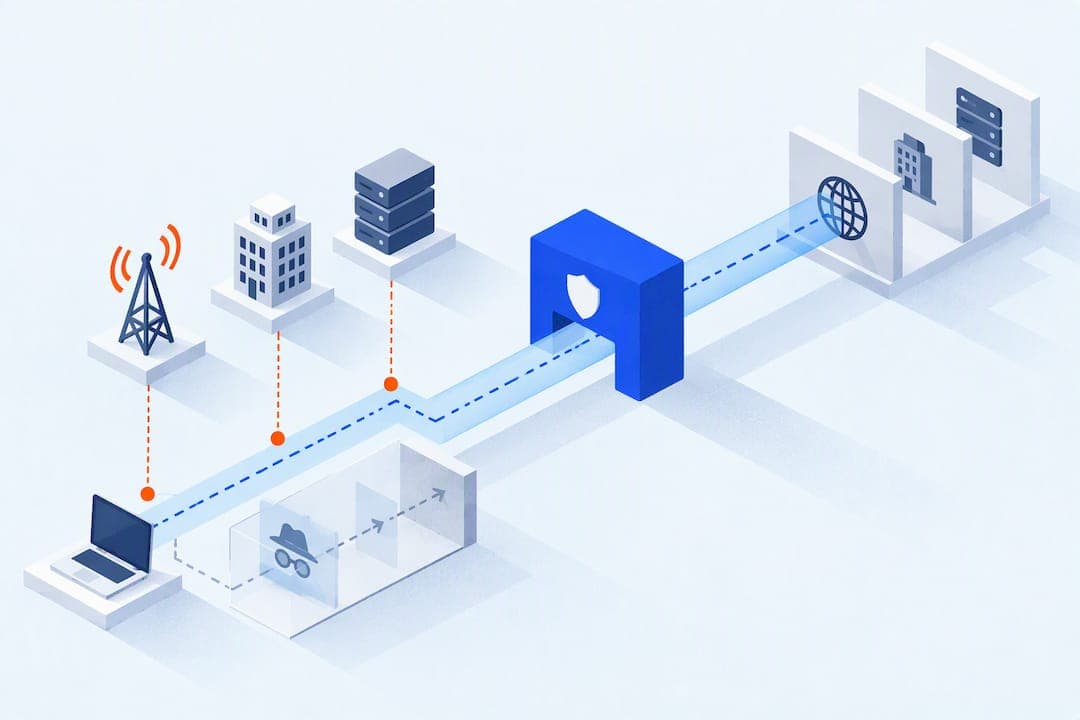
Incognito mode clears local traces on your device: your browsing history, cookies, and site data disappear when you close the window. A VPN works differently: it encrypts your network traffic and hides your IP address from your internet provider and local network. Use incognito for device-level privacy, a VPN for network-level privacy, and both together when you need layered protection, such as on public Wi-Fi.
TL;DR:
- Incognito mode only clears local browsing data and does not conceal your IP address or encrypt network traffic, leaving you visible to your ISP, employer, and websites.
- A VPN encrypts your internet traffic, masks your IP address, and protects against casual ISP logging, especially on public Wi-Fi, but does not prevent login-based tracking.
- Neither incognito nor VPN fully prevents browser fingerprinting or tracking through account logins, making true anonymity difficult to achieve with these tools alone.
- Trust in a VPN depends on verified no-logs policies and transparency; free VPNs often monetize user data, increasing privacy risks.
- Using both tools together is most effective in high-risk situations, such as shared devices on public Wi-Fi, but for everyday privacy, one tool usually suffices.
Table of Contents
- What private browsing actually does and where it stops
- What a VPN hides and the trade-offs you take on
- Who can actually see your activity: a practical breakdown
- Matching the tool to the task in front of you
- The myths that keep this topic confusing
- Building a layered approach when one tool isn't enough
- A quick decision checklist before you open a browser
- A practical take on where people overestimate these tools
- If you'd rather skip the research and just compare providers
- FAQ
- Sources
What private browsing actually does and where it stops
Incognito mode, or private browsing in other browsers, opens a temporary session that does not save history, cookies, or site data once you close the window. Downloads and new bookmarks still stick around on your device, which surprises a lot of people who assume the session leaves zero trace.
What incognito does not do is change your IP address or encrypt anything you send over the network. Your internet provider, your employer's network admin, and every website you visit can still see your activity in real time. Google's own support documentation confirms that Chrome's Incognito blocks third-party cookies by default but still allows some site data to load during the session, and that downloads and bookmarks persist after you close the window.
A few things fall entirely outside incognito's reach:
- Browser fingerprinting, which identifies you by device and configuration details regardless of cookie settings.
- Extensions you've installed, which often keep running and tracking inside incognito unless you disable them manually.
- Anything you explicitly save, like a password you type into a prompt or a file you download.
Incognito is a local privacy tool. It is not built to hide you from the network, and it was never designed to.
What a VPN hides and the trade-offs you take on
A VPN builds an encrypted tunnel between your device and a remote server, then routes your traffic through that server before it reaches the open internet. Websites you visit see the VPN server's IP address, not your home connection, and anyone watching the network between you and the server sees only encrypted traffic. EFF's analysis of VPN use confirms this basic mechanism: your device traffic travels through an encrypted tunnel to a remote server, so the sites you visit see the server's IP rather than yours.
That protection is genuinely useful in specific situations:
- On public Wi-Fi, where a VPN stops anyone else on the network, or the network operator, from reading your traffic.
- Against casual ISP logging, since an encrypted tunnel keeps your provider from seeing which sites you visit.
- For masking your IP from the websites you connect to, which can limit some location-based profiling.
A VPN does nothing for login-based tracking. If you sign into an account, that service knows it's you no matter what IP address you're using, and browser fingerprinting still works the same way it does without a VPN.
The trade-off is trust. You're routing your traffic through a company whose "no-logs" claim may or may not be independently verified, and FTC enforcement action against Avast shows that privacy vendors have misrepresented their data practices before. Free VPNs carry the highest risk here, since a service with no subscription revenue often earns money by collecting and selling the browsing data it claims to protect, a concern detailed in our breakdown of free VPN risks.
Pro Tip: Look for a VPN with a published, independently audited no-logs report rather than one that simply states "we don't log" on its homepage.
Who can actually see your activity: a practical breakdown
Different observers see different things depending on which tool you use, and conflating them is where most confusion about privacy tools starts. Here's how it actually breaks down for each one.
A local device user, meaning someone who uses your computer after you, is exactly who incognito is built to stop. Close the window and your history, cookies, and site data are gone, though downloads and saved files remain. A VPN does nothing here: it has no effect on what's stored locally.
Your Wi-Fi network admin or your internet provider sits on the opposite side. A VPN encrypts your traffic so neither can see which sites you visit or what you send, only that you're connected to a VPN server. Incognito offers zero protection against this observer, since it never touches anything outside your browser.
Websites and ad trackers occupy a middle ground where neither tool fully protects you. A VPN hides your IP address from the sites you visit, which limits some location and network-based tracking. But if you're logged into an account, or if the site uses browser fingerprinting to identify your device by its characteristics, neither incognito nor a VPN stops that. Cookies set during an incognito session still function normally until the window closes.
Law enforcement requests are the most situational case. A VPN can complicate a request by routing it through a different jurisdiction, and in some cases a provider genuinely has nothing to hand over because it keeps no logs. But that protection depends entirely on the provider's actual logging practices, not its marketing copy, and a subpoena served to a VPN company with weak policies or incomplete audits can still surface identifying data.
The pattern that emerges: incognito handles what's visible to someone sitting at your device, a VPN handles what's visible to your network and ISP, and neither one handles what's visible to a service you're logged into.
Matching the tool to the task in front of you
Most privacy questions come down to a specific moment: you're about to do something on a specific device or network, and you want to know which tool fits. Here's how to match them.
- On a shared or public computer, open an incognito window, sign out of any accounts when you're done, and avoid saving passwords in the browser prompt.
- On public Wi-Fi at a coffee shop, airport, or hotel, connect through a reputable VPN before logging into anything sensitive, and use two-factor authentication wherever it's offered as a backup.
- For streaming or accessing geo-restricted content, a VPN can help by changing your apparent location, though expect some services to actively detect and block VPN IP ranges.
- For any logged-in browsing, whether in incognito or with a VPN running, remember that neither tool makes you anonymous to the service you're signed into: for genuine privacy, use an account-free session instead.
The myths that keep this topic confusing
A few persistent myths drive most of the misunderstanding around both tools, and clearing them up changes how people actually use each one.
- Incognito does not hide your activity from websites, your employer's network, or your ISP. It only clears what's stored on your own device.
- A VPN is not a complete anonymity tool. Logging practices, browser fingerprinting, and legal processes served to the provider can all still identify you, a point TechRadar's cybersecurity coverage makes clear when describing incognito as local privacy and VPNs as network-level privacy, neither equaling true anonymity.
- DNS leaks, data-hungry browser extensions, and free VPNs that monetize your browsing data can all undercut the protection you think you're getting. Our guide to what a VPN can and cannot do walks through these failure points in more detail.
Building a layered approach when one tool isn't enough
The situations where you genuinely want both running at once are narrower than you'd think: a shared device on public Wi-Fi, travel where local network trust is low, or streaming where you want both IP masking and a clean local session. Outside those cases, one tool usually covers what you need.
A few additions make either tool meaningfully stronger:
- A tracker or ad blocker, which cuts down on the fingerprinting and cross-site tracking that neither incognito nor a VPN addresses.
- A privacy-first browser, which reduces the data points available for fingerprinting in the first place.
- Staying logged out of accounts you don't need, since login status defeats both tools instantly.
When you're evaluating a VPN provider to add to that stack, check for an audited no-logs policy, a transparent statement of which jurisdiction the company operates under, and a concrete refund policy rather than vague marketing language. Our VPN privacy myths piece covers more of these evaluation points if you want the longer version.
Pro Tip: Run a DNS leak test after connecting to a new VPN. It takes under a minute and catches one of the most common ways a VPN fails silently.

A quick decision checklist before you open a browser
Rather than weighing every factor from scratch each time, run through this short sequence.
- Ask whether you're on a shared or public device: if yes, open incognito and sign out when finished.
- Ask whether you're on public or untrusted Wi-Fi: if yes, connect a vetted VPN before doing anything sensitive.
- Ask whether you're logged into an account you care about keeping private: if yes, neither tool fully protects you, so consider a separate account-free session.
- Before trusting any VPN with this routine, check for clear logging claims, a real refund policy, and the absence of aggressive telemetry or a free-for-data business model.
A practical take on where people overestimate these tools
Most people reach for whichever tool sounds more serious rather than the one that fits the moment. Incognito covers the device-level problem, a VPN covers the network-level one, and most everyday privacy needs call for one or the other, not both. The bigger risk sits with VPN providers themselves: vet them for independent audits and transparency before trusting a "no-logs" claim, and stay away from free services with no clear business model.
— Secure
If you'd rather skip the research and just compare providers
We built Top10VPNs around one idea: comparing VPN providers shouldn't require reading twelve privacy policies yourself. Our reviews weigh audited no-logs claims, refund policies, and jurisdiction transparency side by side, so you can see which providers actually back up their privacy claims.

- Our best VPN comparison covers providers across privacy, speed, and streaming use cases.
- Our testing methodology explains what we check before a provider makes any list.
- Our VPN deals page is there once you've picked a provider and want current pricing.
If you've read this far and know what you need from a VPN, our best-vpn page is the fastest next step.
FAQ
Should I use incognito mode with a VPN?
Running both together makes sense when you're on a shared device and an untrusted network at the same time, such as a hotel business center or a borrowed laptop on public Wi-Fi. Incognito clears your local session while the VPN encrypts what travels over the network, so each one covers a gap the other leaves open.
Can I be tracked if I use incognito mode?
Yes. Incognito only stops your browser from saving history, cookies, and site data locally; it does nothing to hide your IP address or your activity from your ISP, your employer's network, or the websites you visit, as Google's documentation confirms. Browser fingerprinting can also identify you regardless of incognito status.
When shouldn't you use a VPN?
A VPN adds little value when you're already on a trusted home network and not handling sensitive logins, and it won't help if a streaming service or website is actively blocking VPN IP ranges. EFF's research also notes that VPNs are not a reliable way to bypass age-verification or geolocation mandates built to detect them.
Can law enforcement see through VPNs?
It depends almost entirely on the provider's actual logging practices rather than its marketing claims. A VPN with a genuinely audited no-logs policy may have nothing to hand over in response to a legal request, while a provider with weaker practices, as FTC enforcement history has shown with other privacy vendors, could still expose identifying data.
Sources
- Browse privately using Chrome (Incognito) - Google Support
- VPNs Are Not a Solution to Age-Gating Mandates | Electronic Frontier Foundation
- FTC complaint against Avast and related entities
- Is Incognito Mode really private? Here’s the answer from cybersecurity experts | TechRadar